
¶ AMAN — Controller Guide
AMAN (Arrival MANager) creates an airport's landing sequence and shows controllers how much delay each aircraft must absorb. This guide explains how en-route and approach controllers should read and use AMAN.
Managing the sequence—the sequencer role—is not covered in this guide.
¶ 1. What AMAN Does
For each supported airport, AMAN:
- Predicts when each arrival will reach its IAF and the runway.
- Creates a landing sequence for each runway, using the runway arrival rate and wake-turbulence separation.
- Calculates how much delay each aircraft must absorb and where it should be absorbed: by the en-route controller before the IAF, by the approach controller after the IAF, or in a holding stack when the delay cannot be absorbed tactically.
AMAN is an advisory tool. The controller remains responsible for controlling the traffic and applying appropriate separation.
¶ Times and delays
All information displayed by AMAN is based on two times, calculated at both the IAF and the runway:
The required delay is the difference between the scheduled and estimated times: STA − ETA.
- ΔT — total delay: The total number of minutes the aircraft must lose before landing.
- ΔC — en-route delay: The part of the total delay that must be absorbed before the IAF, including any planned holding time.
- Approach delay: The remaining delay, calculated as ΔT − ΔC.
For example, if AMAN displays 2 5:
- The en-route controller absorbs 2 minutes.
- The approach controller absorbs the remaining 3 minutes.
¶ Controller roles
AMAN cannot see how aircraft are actually being flown. If aircraft land in a different order or an aircraft goes around, inform the sequencer immediately so that the sequence can be updated.
¶ 2. Getting Started
¶ Opening AMAN
AMAN is available at:
https://aman-vatsim.lunair.fr/
You do not need to sign in to view the traffic. The home page lists all available airport and en-route pages. Pages with active traffic show a small preview of their timeline. Select a page to open it.
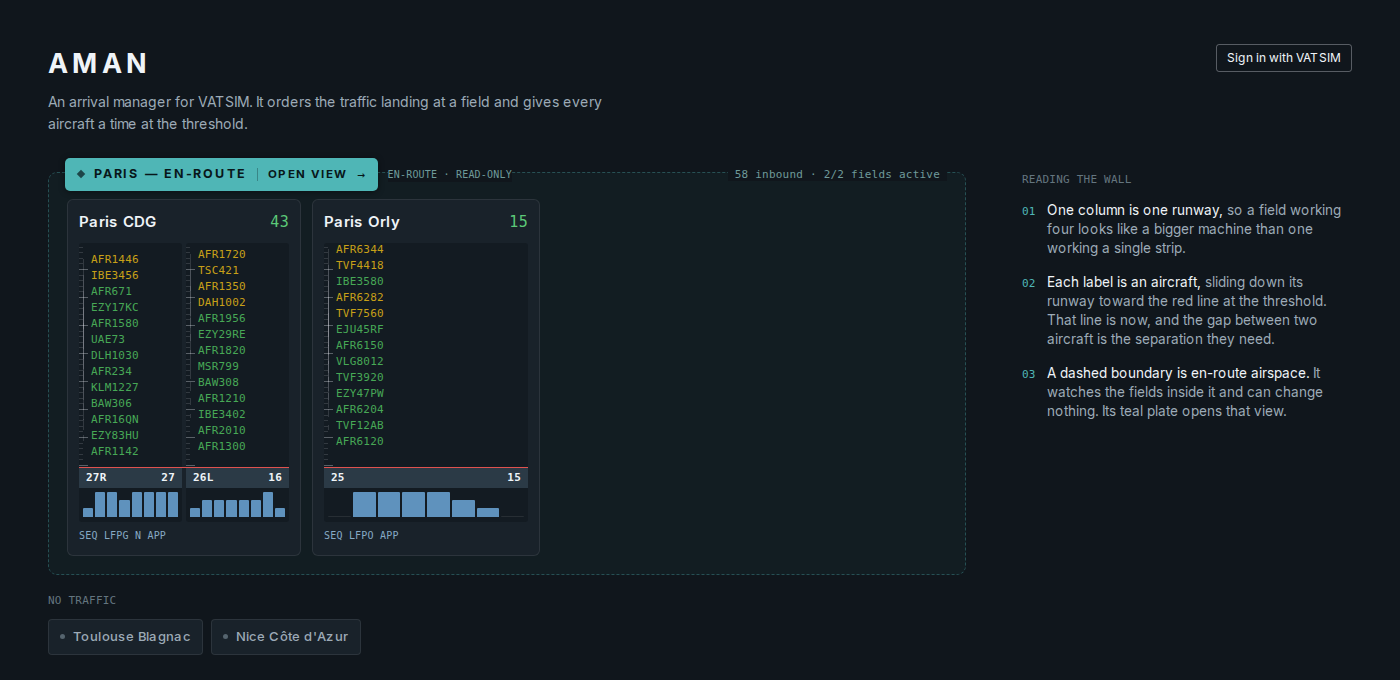
AMAN currently supports:
- Paris Charles de Gaulle — LFPG
- Paris Orly — LFPO
- Toulouse-Blagnac — LFBO
- Nice Côte d'Azur — LFMN
¶ Feeding AMAN
AMAN receives EuroScope traffic data from one controller only. This controller is the feeder.
- When a sequencer is present: The sequencer, also known as CO RADAR, will normally provide the feed. Other controllers do not need to take any action.
- When no sequencer is present: Controllers must agree who will provide the feed before starting. The feeder should be the controller who can see arriving traffic furthest from the airport.
- Never use two feeders at the same time. Receiving two versions of the same traffic makes the sequence unreliable.
- The feeder starts the feed by entering
.aman LFPG, replacingLFPGwith the required airport. Several airports can be added, for example.aman LFPG LFPO.
All other controllers should also load the AMAN plugin, but they must not enter the .aman command. Loading the plugin allows runway changes made in AMAN to reach EuroScope. See Runways for more information.
An airport page becomes active when the first aircraft is received. It closes approximately 10 minutes after the feed stops.
Training sessions on the VATSIM Sweatbox server use a separate AMAN environment under
/sweatbox. These pages have an amber SWEATBOX frame.
¶ 3. Understanding the Screen
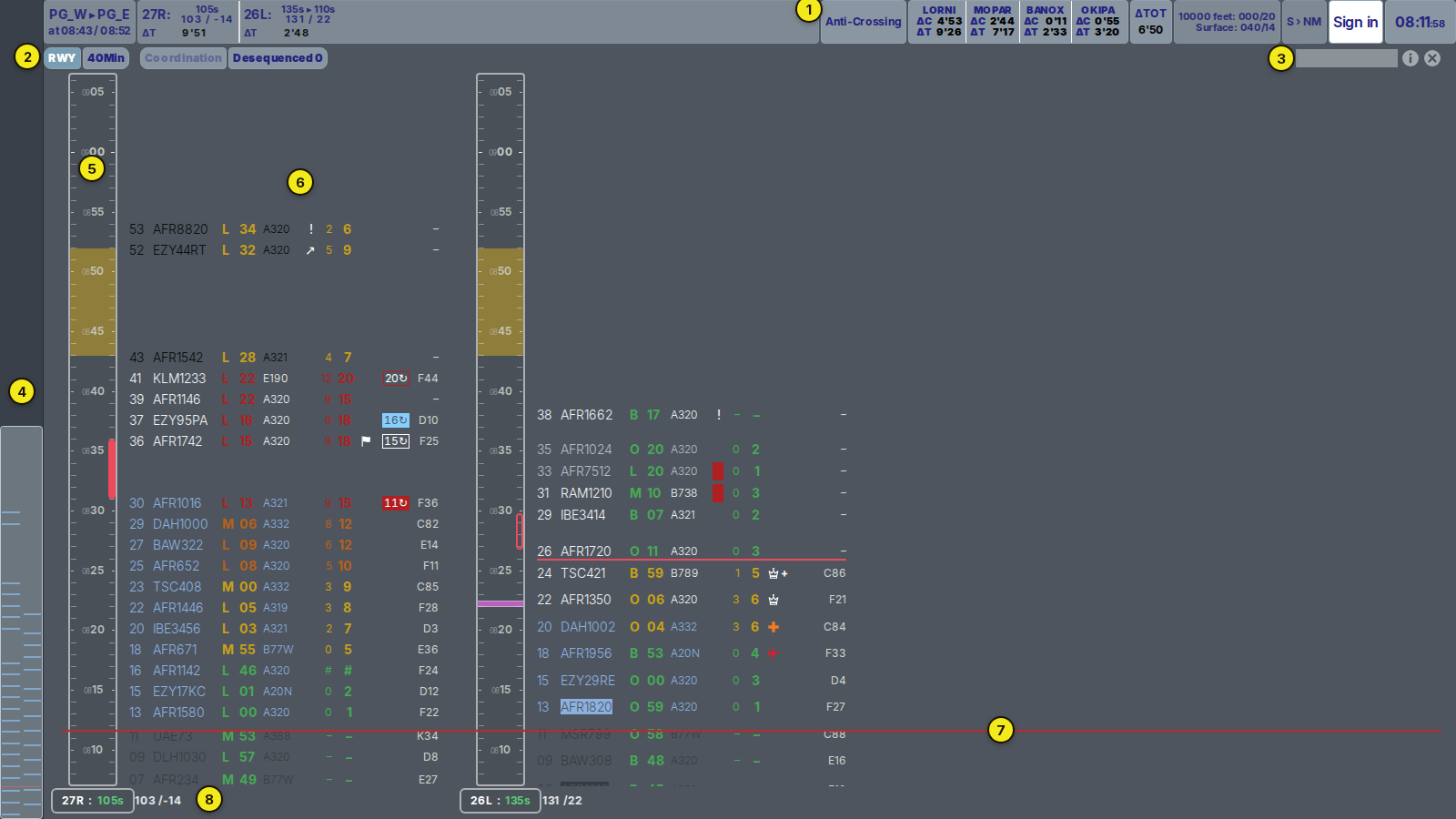
- Header: Shows the runway configuration, runway rates, average delays, wind, the active sequencer, and the UTC time. See The Header.
- Tabs: Switch between the different views available on the page.
- Search: Enter an exact callsign and press Enter to find an aircraft.
- Scroll bar: Represents the next two hours. Each blue mark represents one aircraft, and the light frame shows the period currently visible on screen. Select or drag the frame to move through time.
- Time rail: Shows one mark per minute and a time label every five minutes. Time moves upwards.
- Flights: Each aircraft is positioned at its scheduled time.
- Red line: Shows the current time. The five minutes below the line show the recent past.
- Runway information: Shows the runway assigned to the column, its arrival rate, and how actual landings compare with the planned sequence.
Each side of the airport has its own column. At CDG, one column represents the northern runway pair, 27/09, and the other represents the southern runway pair, 26/08. Following a configuration change, the same column displays the new runway.
To move around the timeline:
- Use the mouse wheel to move forwards or backwards in time.
- Use Shift + mouse wheel to move sideways between timelines.
- Select a tab to return the display to the current time.
If the page stops receiving updates, NO FEED appears in the header. The displayed times are then the last values received and are not live. Reload the page if the feed does not recover automatically.

¶ 4. Reading a Flight
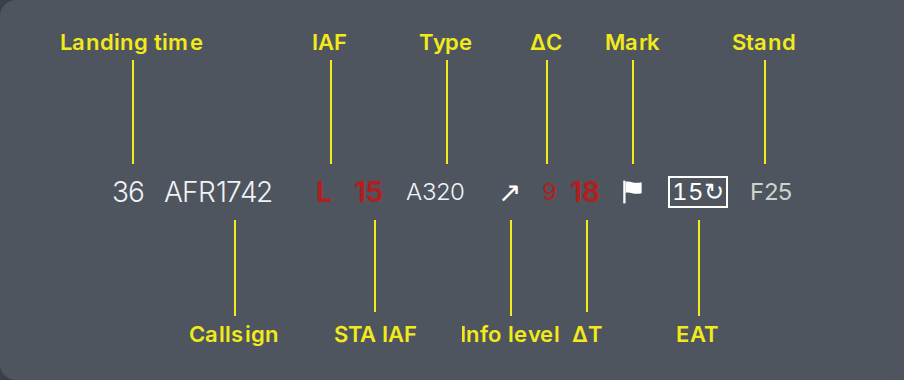
¶ Flight state
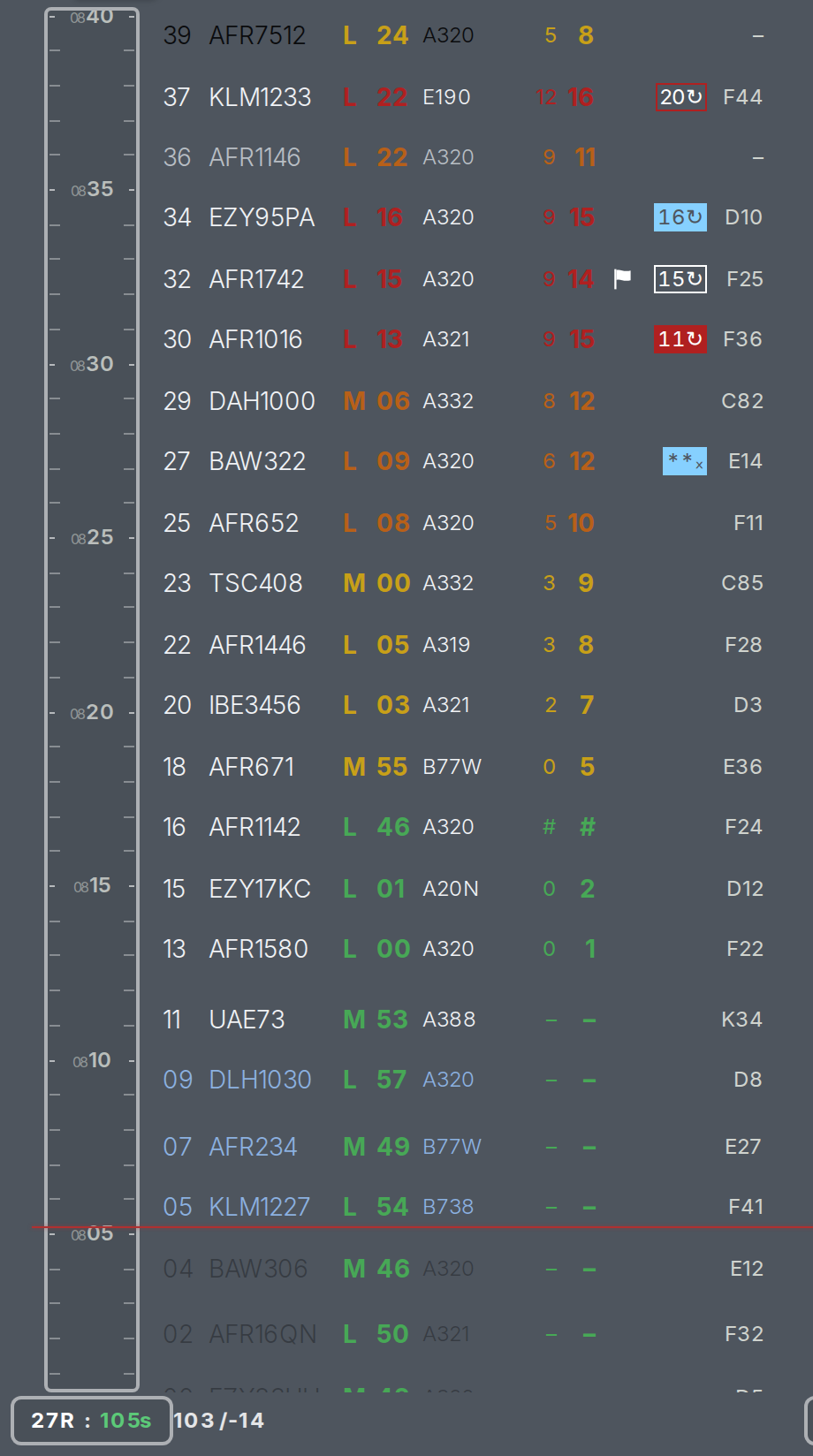
The callsign colour shows how stable the aircraft's position is in the sequence.
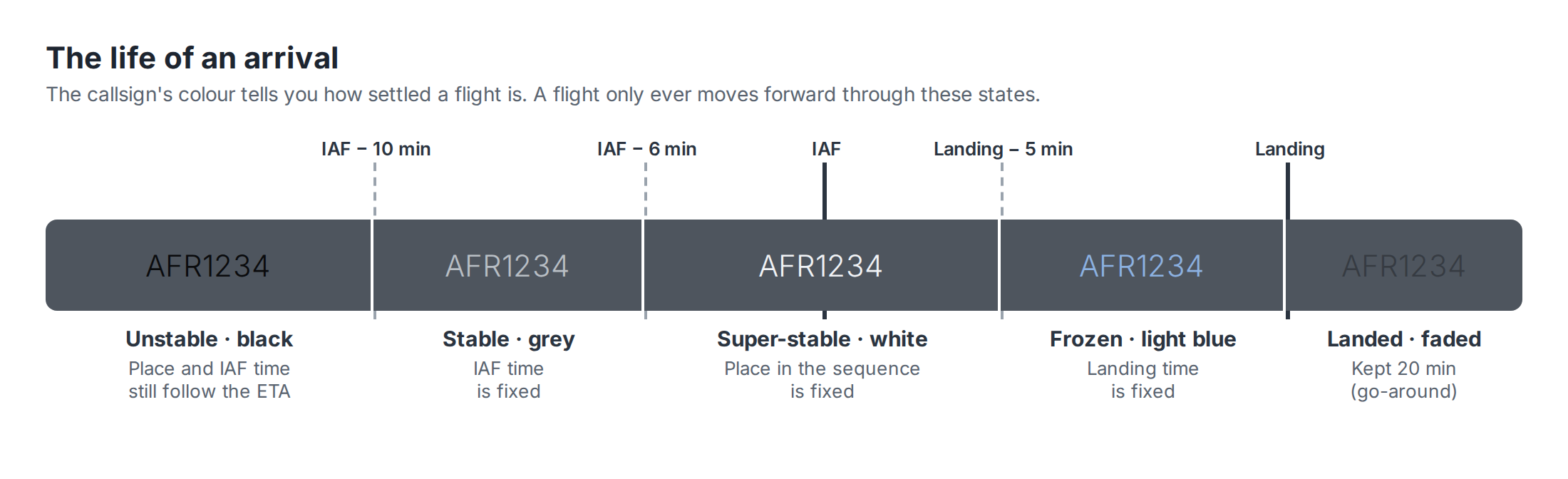
The following image shows a complete column, from aircraft that have already landed at the bottom to aircraft that are still far away, shown in black, at the top:
¶ Delay and responsibility
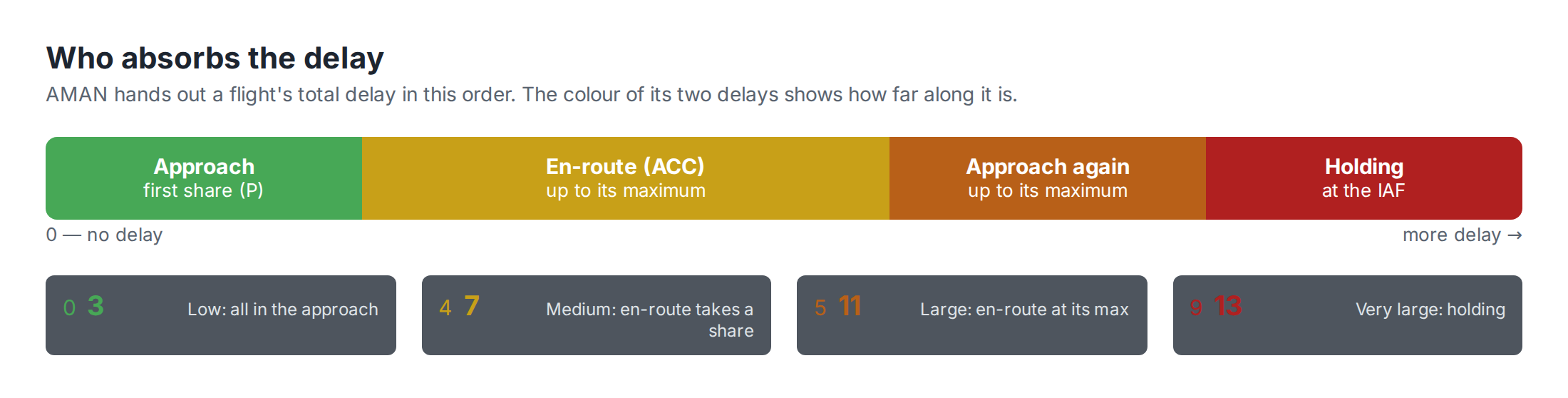
The IAF letter, IAF time, ΔC, and ΔT use the same colour. This colour indicates the severity of the delay and the action that may be required.
¶ Holding and EAT
A red delay means that holding will probably be required. Holding must be coordinated between the en-route controller, approach controller, and sequencer.
The aircraft must leave the holding stack at its STA IAF.
¶ Opening a holding stack
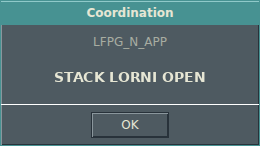
When approach opens a holding stack, the sequencer can send the following message to the relevant en-route sectors:
STACK <IAF> OPEN
To receive this message, you must:
- Be signed in to the AMAN page using your VATSIM account.
- Be connected to VATSIM with your sector callsign.
- Keep the AMAN page open.
¶ Expected Approach Time (EAT)
For an aircraft expected to hold, the sequencer sends its STA IAF as an Expected Approach Time (EAT).
The EAT is the time at which the aircraft is expected to leave the holding facility and continue its approach, marked by its inbound crossing of the IAF.
The EAT is transferred to CoFrance and displayed on the aircraft's line next to ΔC.
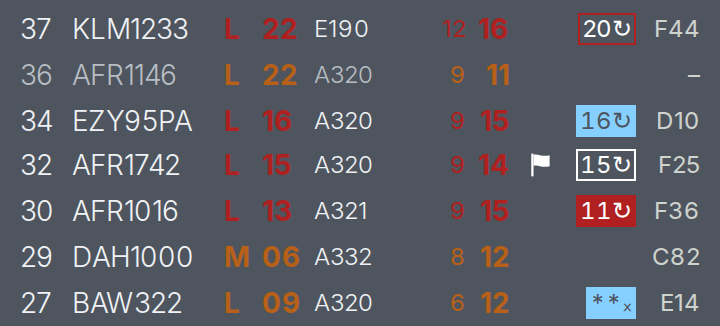
The EAT is removed automatically after the aircraft leaves the holding stack. Only the sequencer can send, update, or delete an EAT. If an EAT appears incorrect, contact the sequencer.
¶ Runways
EuroScope is the reference for runway assignments.
AMAN uses the arrival runway selected in EuroScope, provided that the runway is active in the current configuration and can be used by an arrival from the aircraft's IAF. If you change the arrival runway in EuroScope, AMAN normally updates within a few seconds.
To move an aircraft to the other runway in the same pair, select that runway in EuroScope. For example, when CDG is operating towards the west, select 27L instead of 27R or 26R instead of 26L.
The aircraft keeps the same position in its AMAN column, but its callsign is displayed with inverted colours:
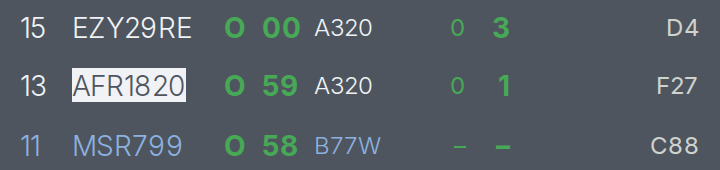
When the sequencer changes an aircraft's runway, or AMAN changes it following a runway configuration change, the new assignment is sent to EuroScope through the AMAN plugin used by the controller tracking the aircraft.
Until the new runway appears in EuroScope, the aircraft's information-level cell is coloured:

- Light blue: The runway change is being sent to EuroScope. This normally takes 10 to 15 seconds.
- Red: The runway change has still not reached EuroScope after several attempts. Check the aircraft's arrival runway.
While this marker is displayed, AMAN keeps its own runway assignment and ignores any different runway selected in EuroScope. If the runway needs to be changed, contact the sequencer.
¶ Other flight symbols
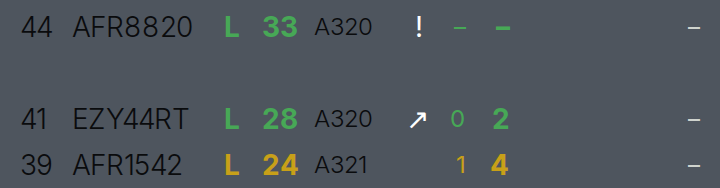
Information level:
↗: A short flight that is still climbing.!: A flight plan has been received, but the aircraft has not yet been identified on radar.
The estimated arrival times for these aircraft are less reliable.
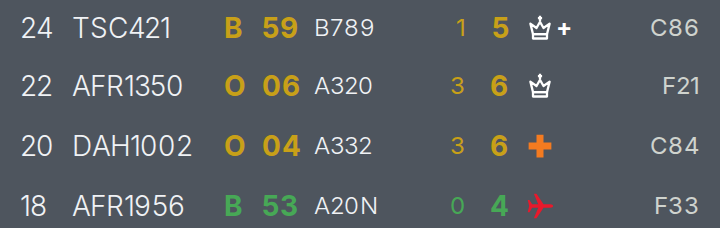
Marks added by the sequencer:
- Red aircraft: Emergency
- Orange cross: Medical flight
- Crown: Official flight
- Flag: Information available
+: More than one mark applies
These marks are provided for information only and do not change the sequence.
# #: The aircraft has gone around and has been placed back into the sequence.

¶ 5. Marks on the Rail
Planned actions entered by the sequencer are displayed on the time rail so that all controllers can see upcoming changes. Hover over a mark to display its associated times.
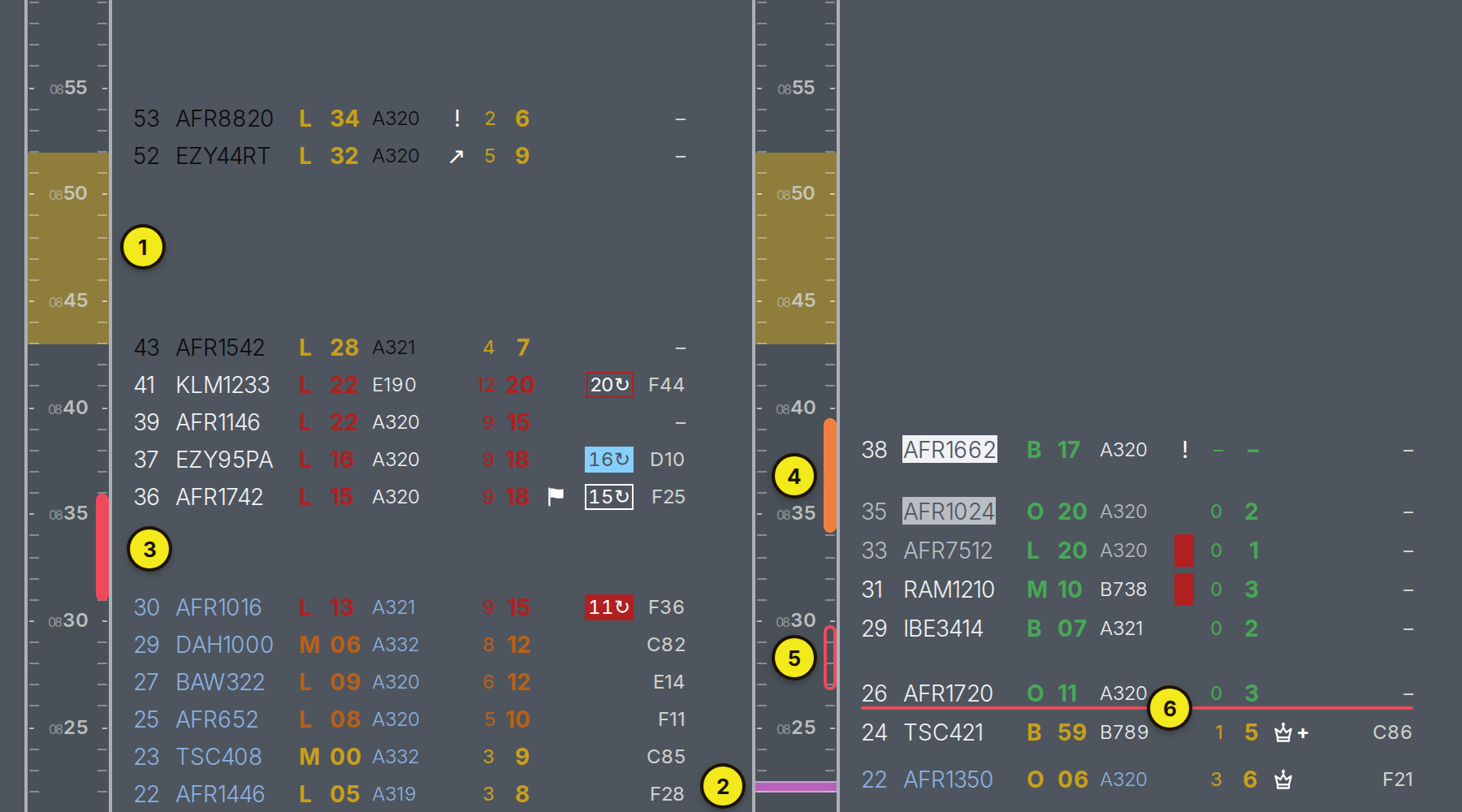
- Gold band: A runway configuration change. It extends from the last landing using the old configuration at the bottom to the first landing using the new configuration at the top.
- Pink bar: A change to the runway arrival rate.
- Solid red bar: A runway closure. Aircraft are moved after the closure. An orange section indicates that aircraft will temporarily use the other runway in the pair.
- Hollow red bar: A planned gap in the sequence. The runway remains open.
- Red line below an aircraft: The runway closure or planned gap begins after that aircraft.
¶ 6. The Header
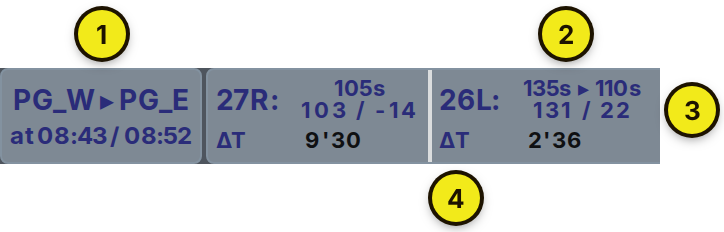

- Runway configuration: Displays the current configuration and any planned change. In the example, the last arrival using
PG_Wlands at 08:43 and the first arrival usingPG_Elands at 08:52. If no change is planned, only the current configuration is displayed. - Arrival rate: Shows the rate for each runway. For example,
135s ▸ 110sindicates a planned rate change. The value turns amber when the spacing is tighter than 3 NM in the current wind conditions. - Actual landing gap and schedule difference: Shows the interval between recent landings and whether landings are running ahead of
+or behind−the plan, in seconds. The value turns orange when the sequence is more than 90 seconds late and red when it is more than 120 seconds late. - ΔT: The average total delay for aircraft landing on that runway during the next 40 minutes.
- Strategy: Shows how the sequencer has configured AMAN to allocate runways.
- Delay by IAF: Shows the average en-route delay, ΔC, and total delay, ΔT, for each IAF during the next 40 minutes. This indicates the expected workload for each arrival flow.
- ΔTOT: The average total delay for the complete sequence during the next 40 minutes.
- Wind: Shows the wind used by AMAN at FL100 and at the surface.
- Arrival-rate unit: Seconds,
S; nautical miles,NM; or aircraft per hour,AC. Only the sequencer can change this setting. - Sequencer: Shows who is sequencing. If nobody is sequencing, it displays No sequencer. When you are signed out, it displays Sign in.
- UTC clock: Shows the current time in UTC.
¶ 7. Using the Page
¶ Finding a flight
Enter the complete callsign in the search field and press Enter.
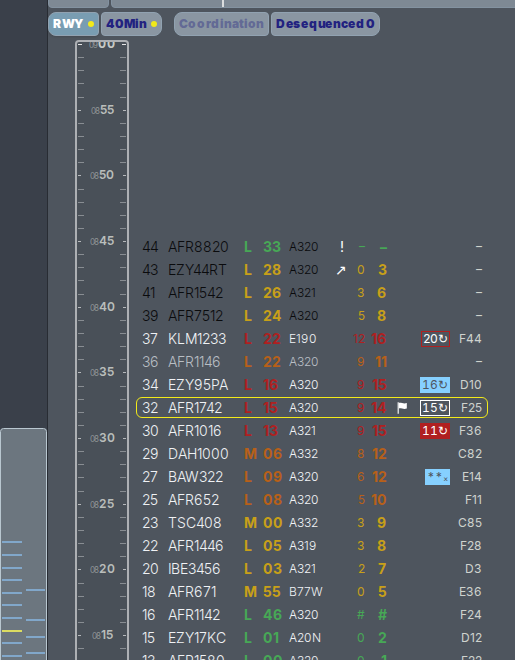
- The aircraft receives a yellow border.
- Tabs containing the aircraft receive a yellow dot.
- The aircraft's mark on the scroll bar turns yellow.
Select anywhere else on the page to clear the search.
¶ Viewing flight details
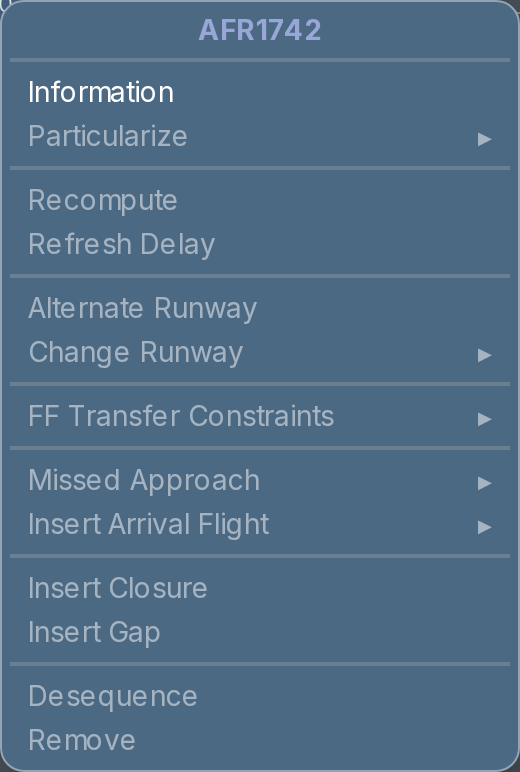
Right-click an aircraft and select Information. The other menu options are reserved for the sequencer and are unavailable to controllers.
The information window displays all data held by AMAN for that aircraft, including:
- Its position in the airport sequence—for example,
AFR1742 / 28means that AFR1742 is the 28th aircraft due to land at the airport. - Its position in the runway sequence—for example,
27R / 16means that it is the 16th aircraft due to land on runway 27R. - Its route, aircraft type, and wake-turbulence category.
- Its stand.
- Its estimated and scheduled times at both the IAF and the runway.
The information window updates as the aircraft progresses. Select Close or press Escape to close it.

¶ Narrow window
When the browser window is placed next to a radar display, AMAN changes to a compact layout. Select the required view from the drop-down list. All other controls are available under ⋯.
¶ 8. Paris En-route Views
Paris ACC controllers use the Paris En-route page at /par.
Each tab represents a group of sectors and only displays aircraft using the relevant IAFs. For example:
TEdisplays arrivals via LORNI and VEBEK.RTdisplays arrivals via BANOX.PG_PO_PBdisplays all arrivals.
Toulouse and Nice do not currently have dedicated en-route pages. Controllers should use the relevant airport page instead.
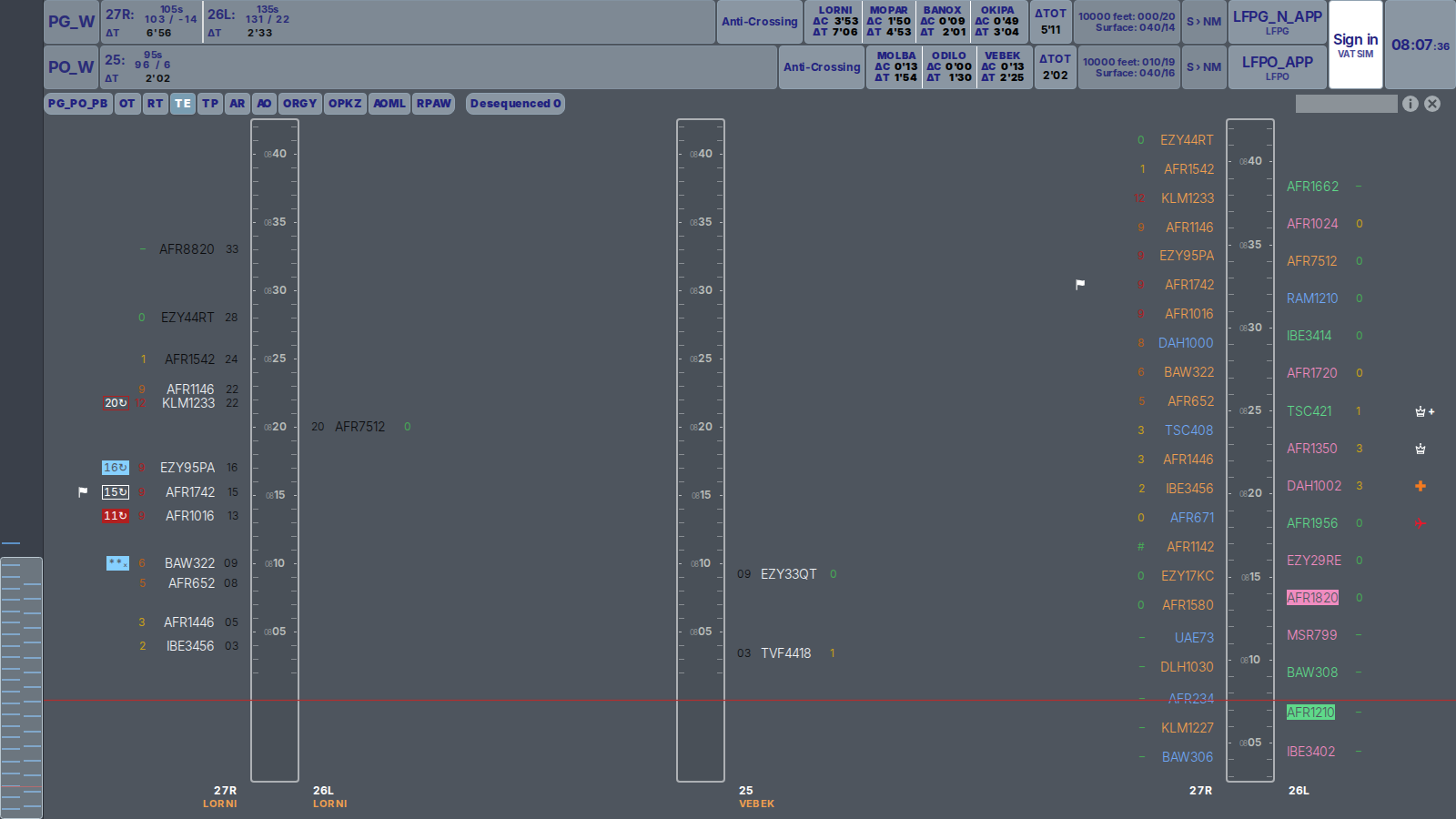
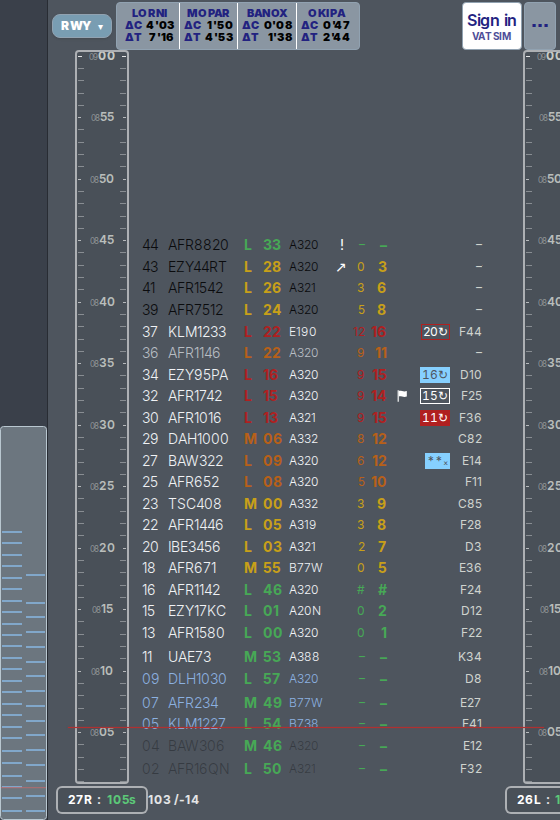
Depending on the selected tab, AMAN displays up to three timelines:
- Sector timelines for CDG and Orly: These only display aircraft using the IAFs managed by your sectors. Aircraft are positioned according to their STA IAF, so the time rail shows the time at the IAF rather than the landing time. At CDG, arrivals for the northern runways are displayed on the left and arrivals for the southern runways on the right. At Orly, all arrivals are displayed on the right. Each entry shows the EAT, ΔC, callsign coloured according to its state, and STA IAF.
- Overview timeline: This displays the complete CDG or Orly arrival sequence according to landing time. It allows you to see where the aircraft under your control fits into the overall sequence. Callsigns are coloured by IAF: LORNI and VEBEK are orange, MOPAR is blue, BANOX and ODILO are green, and OKIPA and MOLBA are pink.
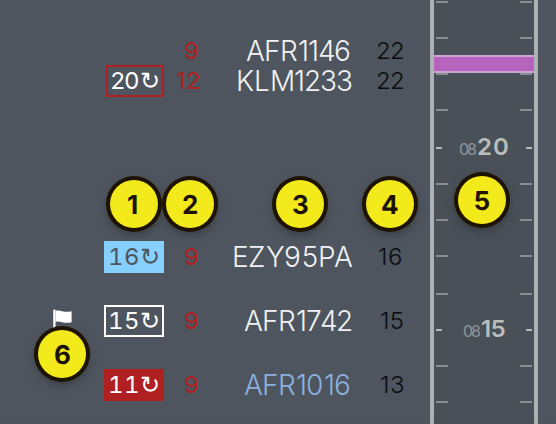
- EAT: Displayed using the same colours as on the airport page. See Expected Approach Time.
- ΔC: The en-route delay, including any planned holding time.
- Callsign: Coloured according to the aircraft's state.
- STA IAF: The time at which the aircraft must leave the IAF.
- Time rail: Shows time at the IAF.
- Mark: Added by the sequencer.
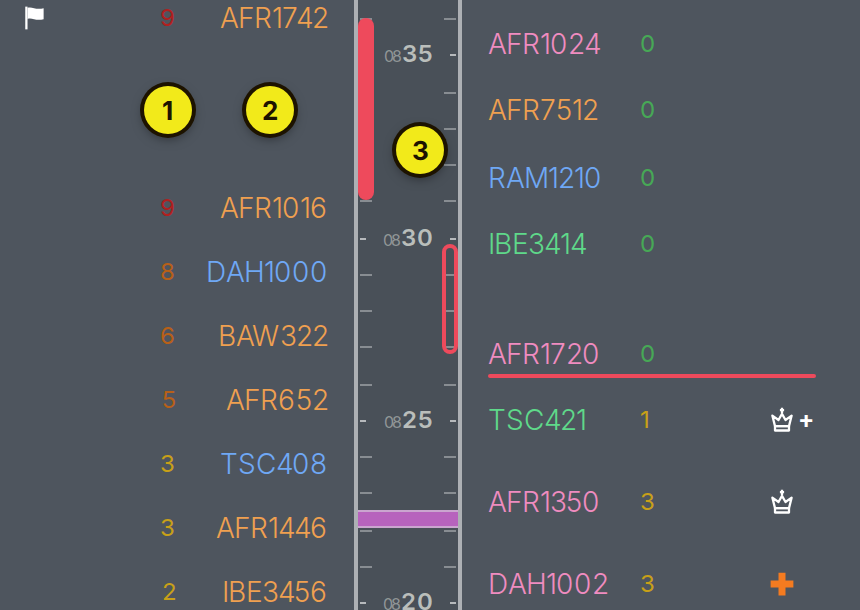
- ΔC: The en-route delay, including any planned holding time.
- Callsign: Coloured according to the aircraft's IAF.
- Time rail: Shows landing time and carries the same marks as the airport page. See Marks on the Rail.