
¶ Pre-Departure Clearance (PDC)
Air–ground data-link services have been available in France since 2016. These services allow pilots and controllers to exchange operational messages digitally and include both CPDLC and Pre-Departure Clearance (PDC).
A Pre-Departure Clearance (PDC) is the digital equivalent of an IFR start-up clearance. Instead of receiving the clearance by voice on the delivery frequency, the flight crew receives it directly in the cockpit through the aircraft’s data-link system and acknowledges it electronically.
PDC reduces frequency congestion and controller workload by limiting the need for voice exchanges. It is widely used at major airports around the world.
¶ Setting Up the PDC Interface
To issue PDC clearances on the network, make sure that the latest version of the Controller Pack is installed. PDC functionality is built directly into vSMR, so no additional plugin or installation is required.
¶ Hoppie ACARS
Before using PDC, you must obtain a Hoppie ACARS code. This code allows vSMR to connect to the Hoppie network and exchange data-link messages with compatible aircraft add-ons.
You can obtain your code from the Hoppie ACARS registration page.
¶ Configuring vSMRs PDC
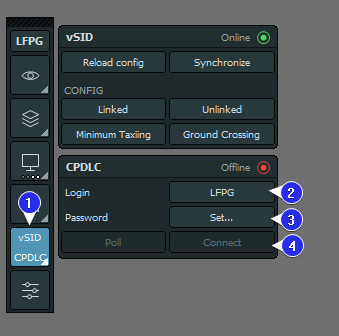
- From the vSMR toolbar, open the vSID PDC window.
- In the Login field, enter the code that pilots must use when sending PDC requests:
- When controlling an aerodrome position from Delivery to Tower, use the airport’s ICAO code.
- When controlling an Approach or Enroute position covering several airports, use the appropriate code from the table below.
- Enter your Hoppie ACARS code to connect vSMR to the Hoppie network.
- Select Connect once the configuration is complete.
- The red Offline indicator should turn green. This confirms that you are connected and ready to receive PDC requests.
¶ Approach & Center Login Codes
Hoppie ACARS allows only one active connection per login code. If you are controlling an Approach or Enroute position while aerodrome controllers below you are also connected, you must use a separate code to provide PDC services.
We recommend creating your PDC login code from the four-letter ICAO prefix of your controller position, replacing its final letter with
X. This prevents confusion with an airport ICAO code and makes the login easy to recognise.For example, for
LFPG_N_APP, useLFPGand replace the finalGwithX, givingLFPX.
¶ Announcing PDC Availability
Pilots must be informed when PDC service is available and which login code they should use.
¶ Controller Information
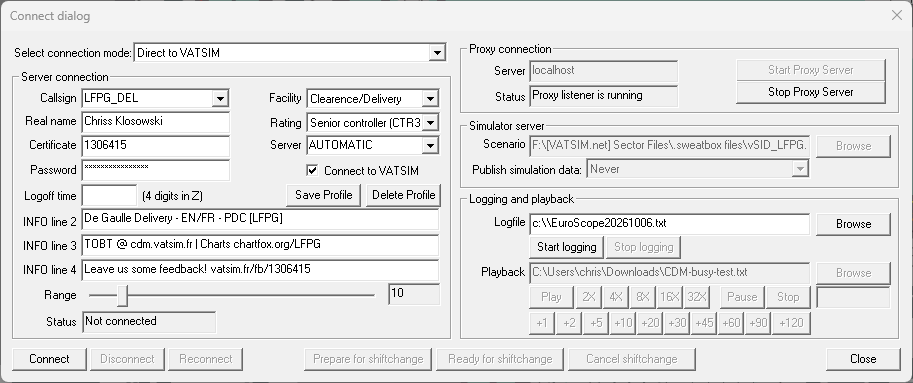
In the EuroScope connection window, add the PDC code to Controller Info Line 2. For example:
- PDC [LFPG]
This tells pilots that PDC requests can be sent using the code LFPG.
¶ vATIS
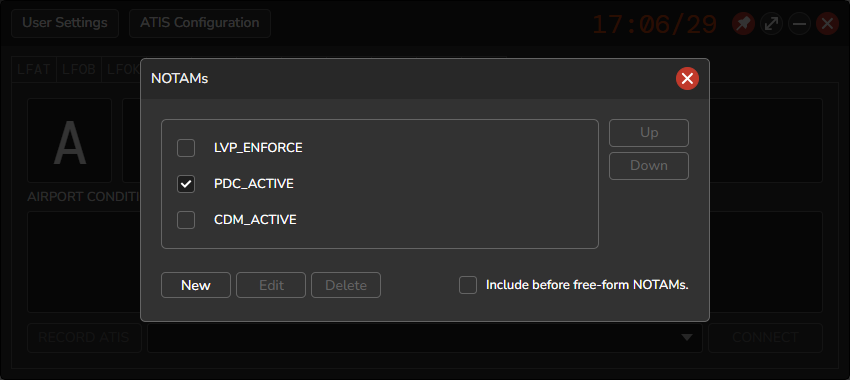
In vATIS, select the NOTAMs field to display the available predefined messages. Selecting PDC_ACTIVE automatically adds the following message to the ATIS:
DATALINK CLEARANCE AVAILABLE LFPG
The predefined message is intended for aerodrome controllers and uses the airport’s ICAO code.
Approach controllers, or controllers providing top-down coverage from a higher position, must manually add the message in the free-text field using their assigned PDC login code. For example:
DATALINK CLEARANCE AVAILABLE LFPX
¶ Using PDC
¶ Receiving a PDC Request
When a PDC start-up request is received, the letter R flashes in the DCL column of the Departure List:

¶ Preparing the Clearance
After receiving a PDC request:
- Check the SID and initial climb proposed by vSID.
- Confirm the suggested SID and initial climb.
- Make sure that a squawk code has been assigned.
- If all information is correct, select Confirm.

¶ Sending the Clearance
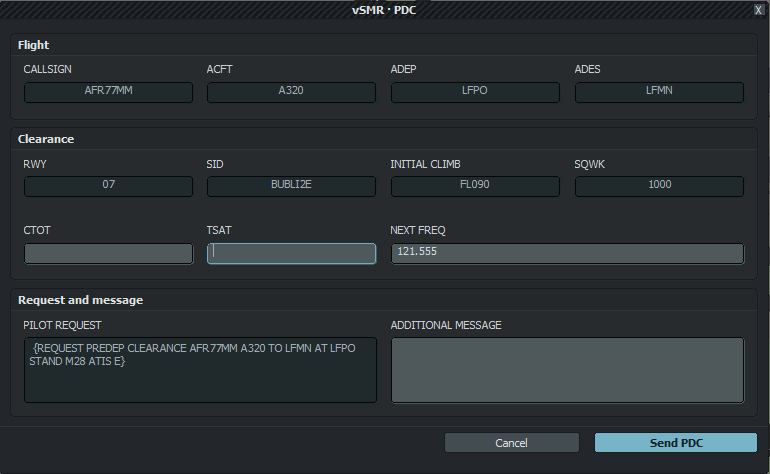
After selecting Confirm, the vSMR PDC window opens.
Cross-check the information, such as the CTOT, TSAT, and next frequency. Check the full clearance one final time, then select Send PDC.
¶ Receiving the Pilot’s Acknowledgement
After the clearance is sent, a yellow V appears in the DCL column, indicating that the PDC has been sent but has not yet been acknowledged by the pilot.
Once the pilot accepts the clearance, the V turns white and confirms receipt and acts as the pilot’s readback. No further action is required until the aircraft calls for pushback and start-up.
¶ When PDC Must Not Be Used
PDC clearances must not be issued:
- When the aircraft is not departing via a published SID.
- When the flight-planned route must be changed, including tactical rerouting due to a flow restriction.
- During the 30 minutes before a planned runway change, to avoid issuing an incorrect SID.
The Delivery Controller (DEL) decides when PDC service should be suspended or resumed.