
¶ vSID — Controller Guide
vSID is a EuroScope plugin that assists controllers with the preparation and management of outbound flight data.
Based on its local configuration, the plugin can suggest or set:
- The departure runway;
- The Standard Instrument Departure (SID); and
- The initial climb clearance.
Assignments may consider runway preference, wake turbulence category, engine type and aerodrome-specific restrictions.
vSID also inserts the SID and runway into the flight-plan route using the SID/RUNWAY format. This ensures that all controllers receive consistent departure information, regardless of their locally selected runway configuration.
Controller responsibility
vSID is a controller aid only. It does not replace knowledge of local Standard Operating Procedures, Letters of Agreement or published restrictions.
The controller remains responsible for cross-checking every runway, SID and initial climb before issuing a clearance. Any discrepancy shall be resolved in accordance with the applicable procedures.
¶ Availability
vSID is available at French aerodromes with published IFR departure procedures.
¶ Tag Items and Colours
vSID uses dedicated tag items in the Departure List and Start-Up List. Their colours distinguish plugin suggestions from values already set in the flight plan.
¶ RWY
¶ SID
¶ CLIMB
¶ All White Lights
Once the required departure data have been set and cross-checked, all relevant tag items should normally appear white.
This All White Lights condition indicates that:
- The departure runway is active;
- The preferred SID is set in the flight plan; and
- The preferred initial climb is set.

The only exception applies at Paris Charles de Gaulle. Depending on the current configuration—minimum taxi or ground crossing—the SID and/or the initial climb may be displayed in blue to indicate that the aircraft is departing from the other runway pair.

All White Lights does not constitute an automatic clearance.
The controller shall verify the displayed information before issuing the IFR clearance.
A valid operational deviation may result in a non-white indication. Such assignments shall be deliberately reviewed and confirmed by the controller.
¶ Controller Procedure
¶ Runway Configuration
All active departure runways shall be selected correctly in the EuroScope Runway Selection dialog before using vSID.
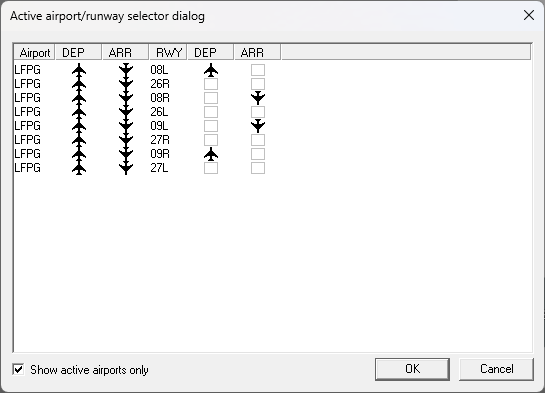
An incorrect or incomplete runway configuration may result in unsuitable departure assignments.
The runway configuration shall be reviewed whenever:
- The operating direction changes;
- A departure runway is opened or closed; or
- The controller assumes responsibility for the aerodrome.
¶ Initial Flight-Plan State
Before normal vSID processing, the SID and temporary altitude should not already be set in the flight plan.
The applicable tag items should initially display the plugin’s suggestions in green or orange. A white or blue indication means that a value has already been set.
Any pre-existing value shall be checked before it is retained or replaced.

¶ Controller-Assisted Assignment
When an aircraft appears in the Departure List:
- Check the SID, runway and initial climb suggested by vSID.
- Verify the assignment against the applicable local procedures.
- Left-click the SID tag item to accept the suggestion.
- Confirm that vSID has set the runway, SID and initial climb in the flight plan.
- Review the resulting colour indications.
- Issue the clearance only after all values have been cross-checked.
Under normal conditions, the accepted assignment should result in All White Lights.

¶ Manual Assignment
Manual assignment is required when:
MANUALis displayed;- No valid automatic assignment is available;
- A non-standard runway, SID or initial climb is required; or
- The controller needs to override the suggested assignment.
Use the applicable left- or right-click action to open the assignment menu for the relevant tag item.
¶ Start-up/Departure List Items
The list used depends on the aerodrome:
- Use the Departure List at non-A-CDM aerodromes.
- Use the Start-Up List at A-CDM aerodromes.
Both lists follow the same operating principles. The Start-Up List includes additional items required for A-CDM procedures.
The following table describes each list item:
- Items shown in grey are hidden by default.
- Items shown in bold & italics are available only in the Start-Up List.
¶ Additional Assignment Conditions
For the Paris airport group, the linked or unlinked configuration is determined by the runways selected at Paris Charles-de-Gaulle & Paris-Orly.
Controllers must select the active runways by ticking at least the relevant boxes on the right-hand side of the runway selection window.
Do not select the boxes for the DEP on the left-hand side, as this will place the airport under your control. Only tick the ARR boxes on the left-hand side to activate the arrival conditions only.
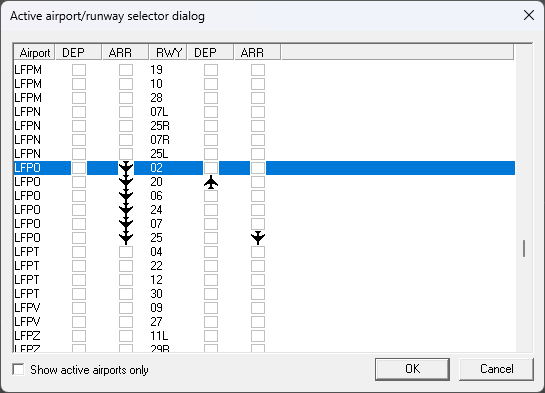
Locally configured assignment rules may be enabled or disabled through the vSID section of the vSMR toolbar in each AVISO display.
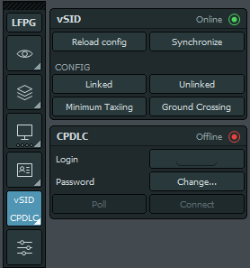
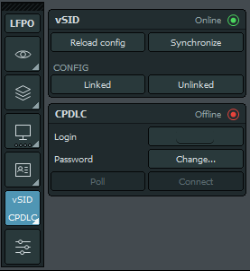
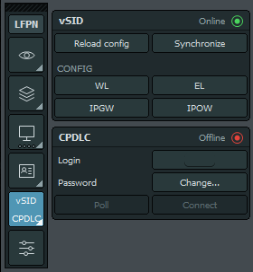
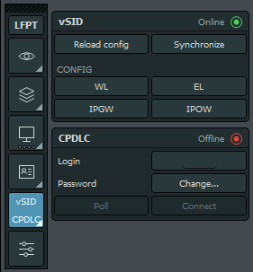
Refer to the applicable aerodrome SOP for:
- Available conditions;
- Operational limitations; and
- Coordination requirements.
¶ Runway Configuration Changes
When the active runway configuration changes in automatic mode, vSID updates the runway and SID for departures that do not have a Clearance Received Flag (CRF).
Flights with a CRF are not modified automatically.
Where a new assignment is required for a cleared flight:
- Coordinate the change as required.
- Select the SID tag item in the applicable list.
- Assign or confirm the new runway and SID.
- Update the pilot’s clearance.
- Cross-check the amended flight-plan data.
¶ RNAV Capability
vSID checks the equipment information filed in the flight plan before assigning an RNAV SID.
Only aircraft recognised as RNAV-capable will receive an RNAV departure. Common modern airliners, including the A320 and B738, may be treated by the plugin as RNAV-capable.
If an RNAV-capable aircraft has filed incorrect equipment information:
- Confirm the aircraft’s RNAV capability with the pilot.
- Correct the flight-plan equipment information where appropriate.
- Recheck the assignment generated by vSID.
Depending on the flight-plan format, the correction may include:
Gin the ICAO equipment field; or/Lwhen FAA equipment suffixes are used.
The controller shall not assign an RNAV SID solely on the basis of aircraft type when the pilot reports that the required capability is unavailable.